> ## Documentation Index
> Fetch the complete documentation index at: https://docs.laravelshopper.dev/llms.txt
> Use this file to discover all available pages before exploring further.
# Advanced Pricing
> Configure advanced pricing options for your products.
Beyond basic product pricing, Shopper offers advanced pricing features to help you implement sophisticated pricing strategies.
## Overview
Advanced pricing allows you to:
* Set up sale prices and compare-at prices
* Create customer group pricing
* Implement quantity-based discounts
* Schedule price changes
## Basic Price Structure
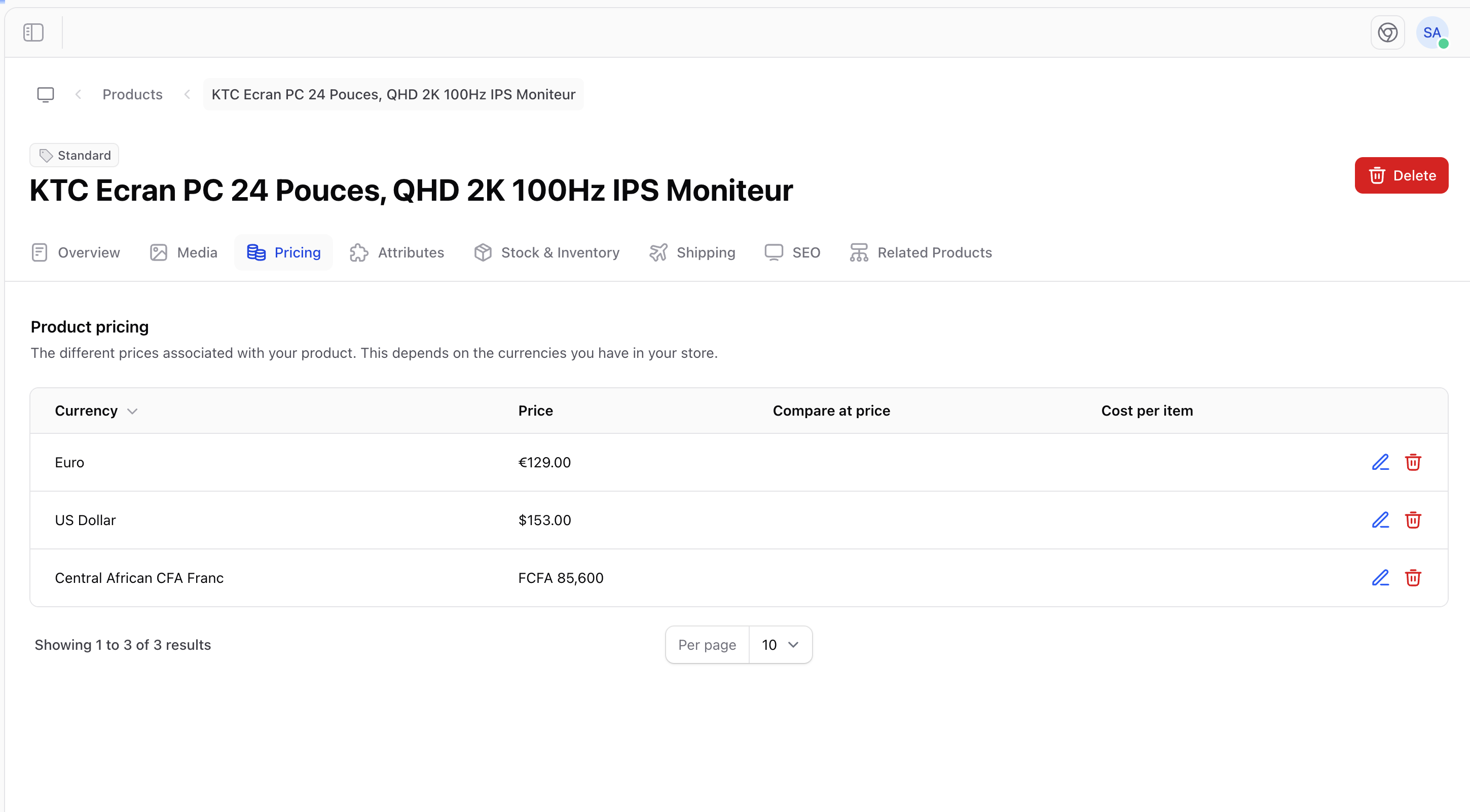
Every product has these pricing fields:
| Field | Description |
| -------------------- | --------------------------------------- |
| **Price** | The current selling price |
| **Compare at price** | Original price (shows as strikethrough) |
| **Cost per item** | Your cost (for margin calculations) |
 ## Sale Pricing
To put a product on sale:
1. Set the **Price** to the sale price
2. Set the **Compare at price** to the original price
3. The original price will display as strikethrough
### Example
| Field | Value | Display |
| ---------------- | ------- | ------------- |
| Price | \$24.99 | Current price |
| Compare at price | \$34.99 | ~~\$34.99~~ |
Customers see: \~\~$34.99~~ **$24.99\*\* (Save 29%)
## Cost and Profit
Track your margins by entering the cost per item:
| Field | Value |
| ---------- | ------- |
| Price | \$49.99 |
| Cost | \$20.00 |
| **Profit** | \$29.99 |
| **Margin** | 60% |
Always enter your product costs to accurately track profit margins and make informed pricing decisions.
## Variant Pricing
When products have variants, you can set different prices:
| Variant | Price |
| ------- | ------- |
| Small | \$29.99 |
| Medium | \$29.99 |
| Large | \$34.99 |
| XL | \$39.99 |
This is useful for:
* Size-based pricing (larger = more expensive)
* Premium option pricing
* Material-based pricing
## Pricing Strategies
Price products similar to competitors.
Price based on perceived value to customers.
Offer discounts when products are bought together.
Adjust prices based on demand and inventory.
## Price Display
Prices appear throughout your store:
* Product listing pages
* Product detail pages
* Shopping cart
* Checkout
* Order confirmations
### Currency Formatting
Prices are formatted according to your currency settings:
| Currency | Format |
| -------- | ---------- |
| USD | \$1,234.56 |
| EUR | €1.234,56 |
| GBP | £1,234.56 |
## Best Practices
### Setting Prices
* **Research competitors** - Know what similar products cost
* **Consider costs** - Ensure profitable margins
* **Test prices** - A/B test different price points
* **Round strategically** - $29.99 vs $30.00
### Managing Sales
* **Plan ahead** - Schedule sales in advance
* **Limit duration** - Create urgency with end dates
* **Track results** - Monitor sales performance
* **Restore prices** - Remember to revert after sales end
Use the "Compare at price" feature to show value even when not running a sale - display the "regular" price to emphasize everyday savings.
## Pricing Checklist
Before publishing a product, verify:
* [ ] Price is set correctly
* [ ] Compare at price (if applicable) is higher than price
* [ ] Cost per item is entered for margin tracking
* [ ] Variant prices are consistent with your strategy
* [ ] Currency formatting looks correct
For developer details, see the [Pricing documentation](/v2/pricing).
## Sale Pricing
To put a product on sale:
1. Set the **Price** to the sale price
2. Set the **Compare at price** to the original price
3. The original price will display as strikethrough
### Example
| Field | Value | Display |
| ---------------- | ------- | ------------- |
| Price | \$24.99 | Current price |
| Compare at price | \$34.99 | ~~\$34.99~~ |
Customers see: \~\~$34.99~~ **$24.99\*\* (Save 29%)
## Cost and Profit
Track your margins by entering the cost per item:
| Field | Value |
| ---------- | ------- |
| Price | \$49.99 |
| Cost | \$20.00 |
| **Profit** | \$29.99 |
| **Margin** | 60% |
Always enter your product costs to accurately track profit margins and make informed pricing decisions.
## Variant Pricing
When products have variants, you can set different prices:
| Variant | Price |
| ------- | ------- |
| Small | \$29.99 |
| Medium | \$29.99 |
| Large | \$34.99 |
| XL | \$39.99 |
This is useful for:
* Size-based pricing (larger = more expensive)
* Premium option pricing
* Material-based pricing
## Pricing Strategies
Price products similar to competitors.
Price based on perceived value to customers.
Offer discounts when products are bought together.
Adjust prices based on demand and inventory.
## Price Display
Prices appear throughout your store:
* Product listing pages
* Product detail pages
* Shopping cart
* Checkout
* Order confirmations
### Currency Formatting
Prices are formatted according to your currency settings:
| Currency | Format |
| -------- | ---------- |
| USD | \$1,234.56 |
| EUR | €1.234,56 |
| GBP | £1,234.56 |
## Best Practices
### Setting Prices
* **Research competitors** - Know what similar products cost
* **Consider costs** - Ensure profitable margins
* **Test prices** - A/B test different price points
* **Round strategically** - $29.99 vs $30.00
### Managing Sales
* **Plan ahead** - Schedule sales in advance
* **Limit duration** - Create urgency with end dates
* **Track results** - Monitor sales performance
* **Restore prices** - Remember to revert after sales end
Use the "Compare at price" feature to show value even when not running a sale - display the "regular" price to emphasize everyday savings.
## Pricing Checklist
Before publishing a product, verify:
* [ ] Price is set correctly
* [ ] Compare at price (if applicable) is higher than price
* [ ] Cost per item is entered for margin tracking
* [ ] Variant prices are consistent with your strategy
* [ ] Currency formatting looks correct
For developer details, see the [Pricing documentation](/v2/pricing).