> ## Documentation Index
> Fetch the complete documentation index at: https://docs.laravelshopper.dev/llms.txt
> Use this file to discover all available pages before exploring further.
# Managing Attributes
> Create product attributes for variations like size, color, and material.
Attributes define the characteristics of your products. They're essential for creating product variants and helping customers filter and compare products.
## Overview
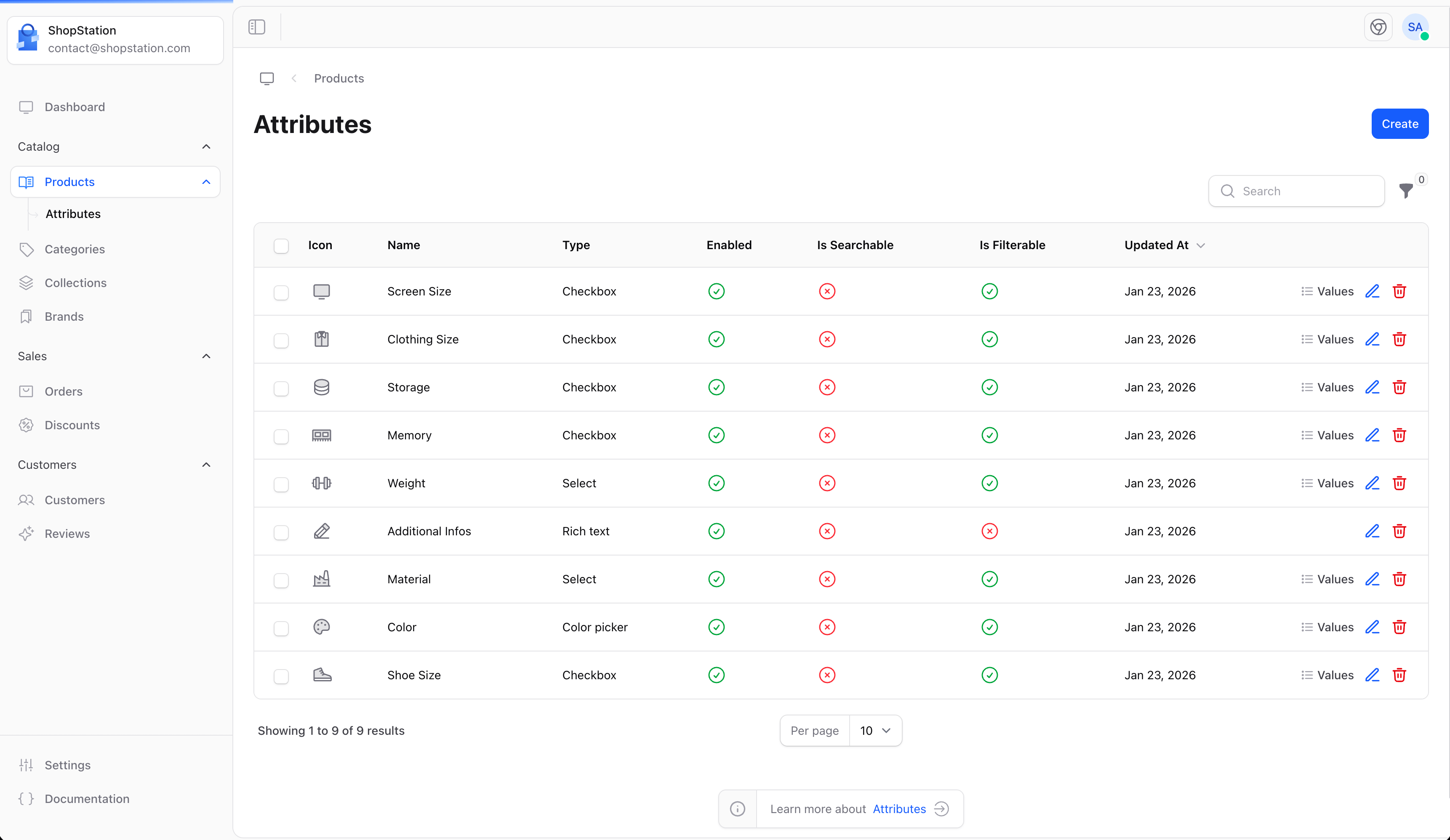
Attributes describe product properties such as:
* **Size** - Small, Medium, Large, XL
* **Color** - Red, Blue, Green, Black
* **Material** - Cotton, Polyester, Leather
* **Storage** - 64GB, 128GB, 256GB
## Accessing Attributes
Click on **Attributes** in the sidebar to access attribute management.
 ## Creating an Attribute
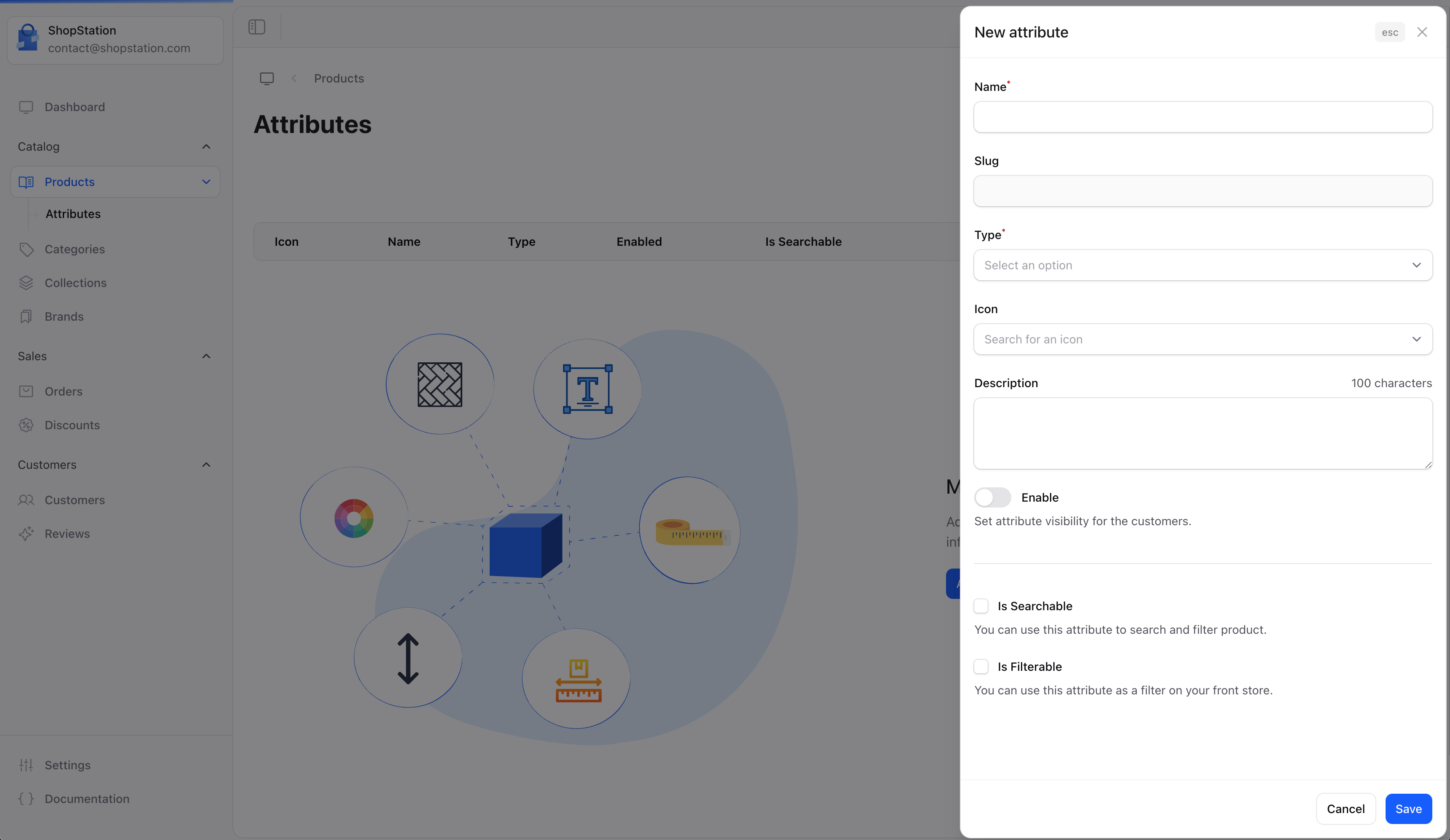
To create a new attribute:
1. Click the **Create** button
2. Define the attribute details
3. Add attribute values
4. Click **Save**
## Creating an Attribute
To create a new attribute:
1. Click the **Create** button
2. Define the attribute details
3. Add attribute values
4. Click **Save**
 ### Attribute Fields
| Field | Required | Description |
| --------------- | -------- | ----------------------------------------------- |
| **Name** | Yes | The attribute name (e.g., "Color", "Size") |
| **Type** | Yes | How values are selected (dropdown, radio, etc.) |
| **Description** | No | Explain what this attribute represents |
| **Enabled** | No | Toggle to activate the attribute |
### Attribute Types
Choose how customers will select attribute values:
| Type | Best For |
| ----------------- | ----------------------------------- |
| **Dropdown** | Many options (countries, sizes) |
| **Radio buttons** | Few options with clear differences |
| **Checkbox** | Multiple selections allowed |
| **Color swatch** | Color selection with visual preview |
| **Text** | Custom customer input |
## Attribute Values
After creating an attribute, add the possible values:
| Attribute | Example Values |
| --------- | -------------------------------------- |
| Size | XS, S, M, L, XL, XXL |
| Color | Red, Blue, Green, Yellow, Black, White |
| Material | Cotton, Wool, Polyester, Silk |
## Using Attributes on Products
Once created, attributes can be assigned to products:
### Attribute Fields
| Field | Required | Description |
| --------------- | -------- | ----------------------------------------------- |
| **Name** | Yes | The attribute name (e.g., "Color", "Size") |
| **Type** | Yes | How values are selected (dropdown, radio, etc.) |
| **Description** | No | Explain what this attribute represents |
| **Enabled** | No | Toggle to activate the attribute |
### Attribute Types
Choose how customers will select attribute values:
| Type | Best For |
| ----------------- | ----------------------------------- |
| **Dropdown** | Many options (countries, sizes) |
| **Radio buttons** | Few options with clear differences |
| **Checkbox** | Multiple selections allowed |
| **Color swatch** | Color selection with visual preview |
| **Text** | Custom customer input |
## Attribute Values
After creating an attribute, add the possible values:
| Attribute | Example Values |
| --------- | -------------------------------------- |
| Size | XS, S, M, L, XL, XXL |
| Color | Red, Blue, Green, Yellow, Black, White |
| Material | Cotton, Wool, Polyester, Silk |
## Using Attributes on Products
Once created, attributes can be assigned to products:
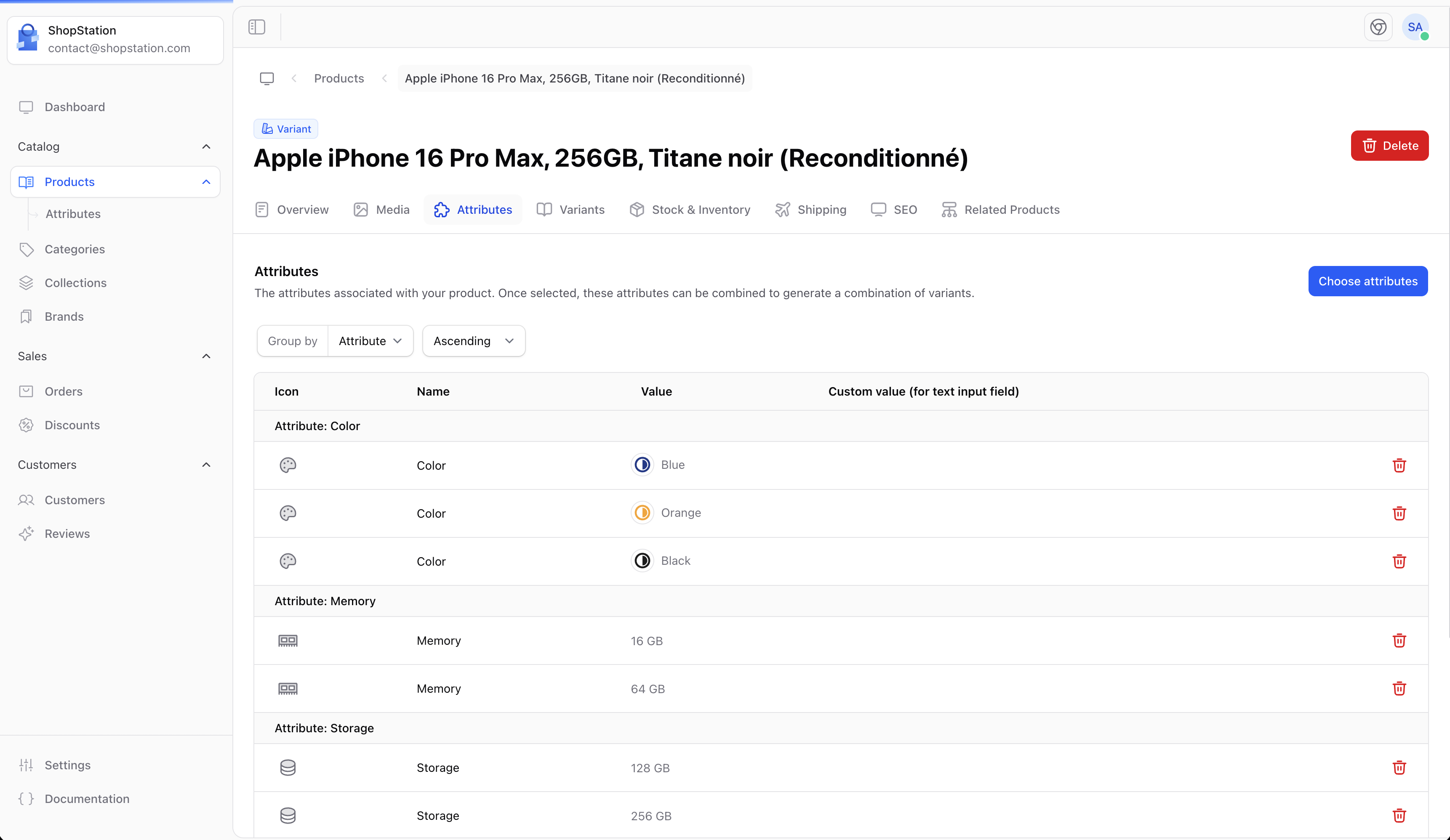 Attributes enable you to:
* Create product variants (e.g., a shirt in multiple sizes)
* Allow customers to filter products
* Compare products with similar attributes
## Common Attribute Examples
### Fashion / Apparel
| Attribute | Values |
| --------- | ----------------------- |
| Size | XS, S, M, L, XL |
| Color | Various colors |
| Material | Cotton, Polyester, etc. |
| Fit | Slim, Regular, Loose |
### Electronics
| Attribute | Values |
| --------- | -------------------- |
| Storage | 64GB, 128GB, 256GB |
| Color | Black, White, Silver |
| Memory | 4GB, 8GB, 16GB |
### Food & Beverages
| Attribute | Values |
| --------- | ------------------------ |
| Weight | 250g, 500g, 1kg |
| Flavor | Vanilla, Chocolate, etc. |
## Best Practices
Create attributes before adding products. It's easier to set up your attribute structure first and then assign them to products.
* **Be consistent** - Use the same attribute names across similar products
* **Keep it simple** - Only create attributes that help customers make decisions
* **Use clear names** - Attribute names should be instantly understandable
* **Order logically** - Arrange values in a logical order (S, M, L, not M, S, L)
For developer details, see the [Attributes documentation](/v2/attributes).
Attributes enable you to:
* Create product variants (e.g., a shirt in multiple sizes)
* Allow customers to filter products
* Compare products with similar attributes
## Common Attribute Examples
### Fashion / Apparel
| Attribute | Values |
| --------- | ----------------------- |
| Size | XS, S, M, L, XL |
| Color | Various colors |
| Material | Cotton, Polyester, etc. |
| Fit | Slim, Regular, Loose |
### Electronics
| Attribute | Values |
| --------- | -------------------- |
| Storage | 64GB, 128GB, 256GB |
| Color | Black, White, Silver |
| Memory | 4GB, 8GB, 16GB |
### Food & Beverages
| Attribute | Values |
| --------- | ------------------------ |
| Weight | 250g, 500g, 1kg |
| Flavor | Vanilla, Chocolate, etc. |
## Best Practices
Create attributes before adding products. It's easier to set up your attribute structure first and then assign them to products.
* **Be consistent** - Use the same attribute names across similar products
* **Keep it simple** - Only create attributes that help customers make decisions
* **Use clear names** - Attribute names should be instantly understandable
* **Order logically** - Arrange values in a logical order (S, M, L, not M, S, L)
For developer details, see the [Attributes documentation](/v2/attributes).