> ## Documentation Index
> Fetch the complete documentation index at: https://docs.laravelshopper.dev/llms.txt
> Use this file to discover all available pages before exploring further.
# Payments
> Process payments through Stripe, PayPal, or any provider using the driver-based payment system.
The `shopper/payment` package handles payment processing through a driver-based architecture. It sits between your storefront and payment providers, giving you a single API to initiate, authorize, capture, and refund payments, regardless of which provider you use.
Every payment operation is recorded as a transaction, giving you a complete audit trail. The package automatically keeps your order's payment status in sync as transactions succeed or fail.
## How It Works
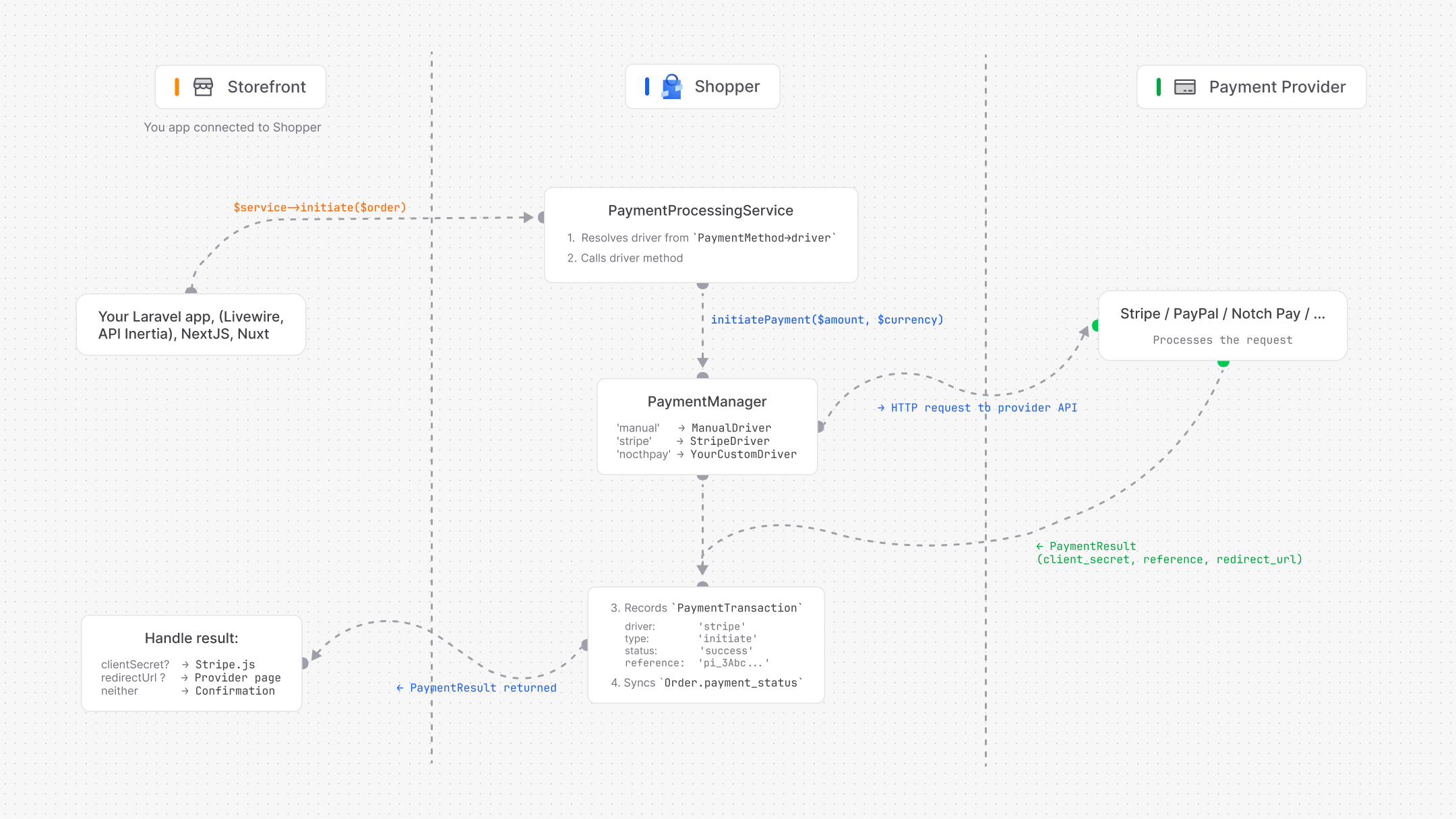
The payment system has four main pieces:
1. **PaymentManager** resolves payment drivers by name (`stripe`, `manual`, `paypal`, etc.)
2. **PaymentDriver** is the contract every provider must implement
3. **PaymentProcessingService** wraps driver calls with transaction recording and status sync
4. **PaymentTransaction** stores every operation for audit and debugging
 ## Payment Drivers
### Available Drivers
| Driver | Package | Code | Description |
| ------ | ----------------- | -------- | -------------------------------------------------- |
| Manual | `shopper/payment` | `manual` | No API. For cash on delivery, bank transfers, etc. |
| Stripe | `shopper/stripe` | `stripe` | Stripe PaymentIntents with 3D Secure support |
### Using the Facade
The `Payment` facade gives you access to the driver manager:
```php theme={null}
use Shopper\Payment\Facades\Payment;
$stripe = Payment::driver('stripe');
$manual = Payment::driver('manual');
$manual = Payment::driver();
Payment::availableDrivers();
Payment::configuredDrivers();
Payment::isConfigured('stripe');
```
### The PaymentDriver Contract
Every driver implements `Shopper\Payment\Contracts\PaymentDriver`:
| Method | Return | Purpose |
| -------------------- | --------------- | -------------------------------------------- |
| `code()` | `string` | Unique identifier (`stripe`, `paypal`, etc.) |
| `name()` | `string` | Display name for the admin panel |
| `logo()` | `?string` | URL to the provider's logo |
| `isConfigured()` | `bool` | Whether API credentials are set |
| `supportsWebhooks()` | `bool` | Whether the driver handles webhook events |
| `supportsRefunds()` | `bool` | Whether the driver can process refunds |
| `initiatePayment()` | `PaymentResult` | Create a payment session with the provider |
| `authorizePayment()` | `PaymentResult` | Confirm/authorize a payment |
| `capturePayment()` | `PaymentResult` | Capture funds from an authorized payment |
| `refundPayment()` | `PaymentResult` | Refund a captured payment (full or partial) |
| `cancelPayment()` | `PaymentResult` | Cancel a payment before capture |
| `retrievePayment()` | `PaymentResult` | Check payment status from the provider |
| `handleWebhook()` | `WebhookResult` | Process an incoming webhook event |
Shopper provides an abstract `Driver` class with default implementations that throw `PaymentException::notSupported()`. Extend it and override only the methods your provider supports.
## Processing Payments
The `PaymentProcessingService` is the recommended way to process payments. It wraps every driver call with:
* Automatic transaction recording in the database
* Order payment status synchronization
* Consistent error handling
```php theme={null}
use Shopper\Payment\Services\PaymentProcessingService;
$service = app(PaymentProcessingService::class);
```
### Initiating a Payment
This is the first step in any payment flow. It creates a payment session with the provider and records an `initiate` transaction.
Here's how the [demo store](https://demo.laravelshopper.dev) initiates a payment at checkout:
```php theme={null}
use Shopper\Payment\Services\PaymentProcessingService;
$service = resolve(PaymentProcessingService::class);
$result = $service->initiate($order);
if (! $result->success) {
session()->flash('error', $result->message ?? 'Payment initiation failed.');
return redirect()->route('order-confirmed', $order->number);
}
if ($result->clientSecret) {
session()->put('stripe_payment', [
'client_secret' => $result->clientSecret,
'publishable_key' => $result->data['publishable_key'],
]);
return redirect()->route('stripe-payment', $order->number);
}
if ($result->redirectUrl) {
return redirect($result->redirectUrl);
}
return redirect()->route('order-confirmed', $order->number);
```
The `PaymentResult` tells you what to do next:
* **`clientSecret`** is set. Redirect the customer to a page with the Stripe.js Payment Element
* **`redirectUrl`** is set. Redirect the customer to the provider (PayPal, 3D Secure, etc.)
* **Neither**. The payment completed immediately (manual driver, for example)
### Authorizing a Payment
Confirms a previously initiated payment. On success, the order's `payment_status` is updated to `Authorized`.
```php theme={null}
$result = $service->authorize($order, $reference, [
'payment_method' => 'pm_card_visa',
'return_url' => route('payment.callback', $order),
]);
if ($result->requiresAction()) {
return redirect($result->redirectUrl);
}
```
### Capturing a Payment
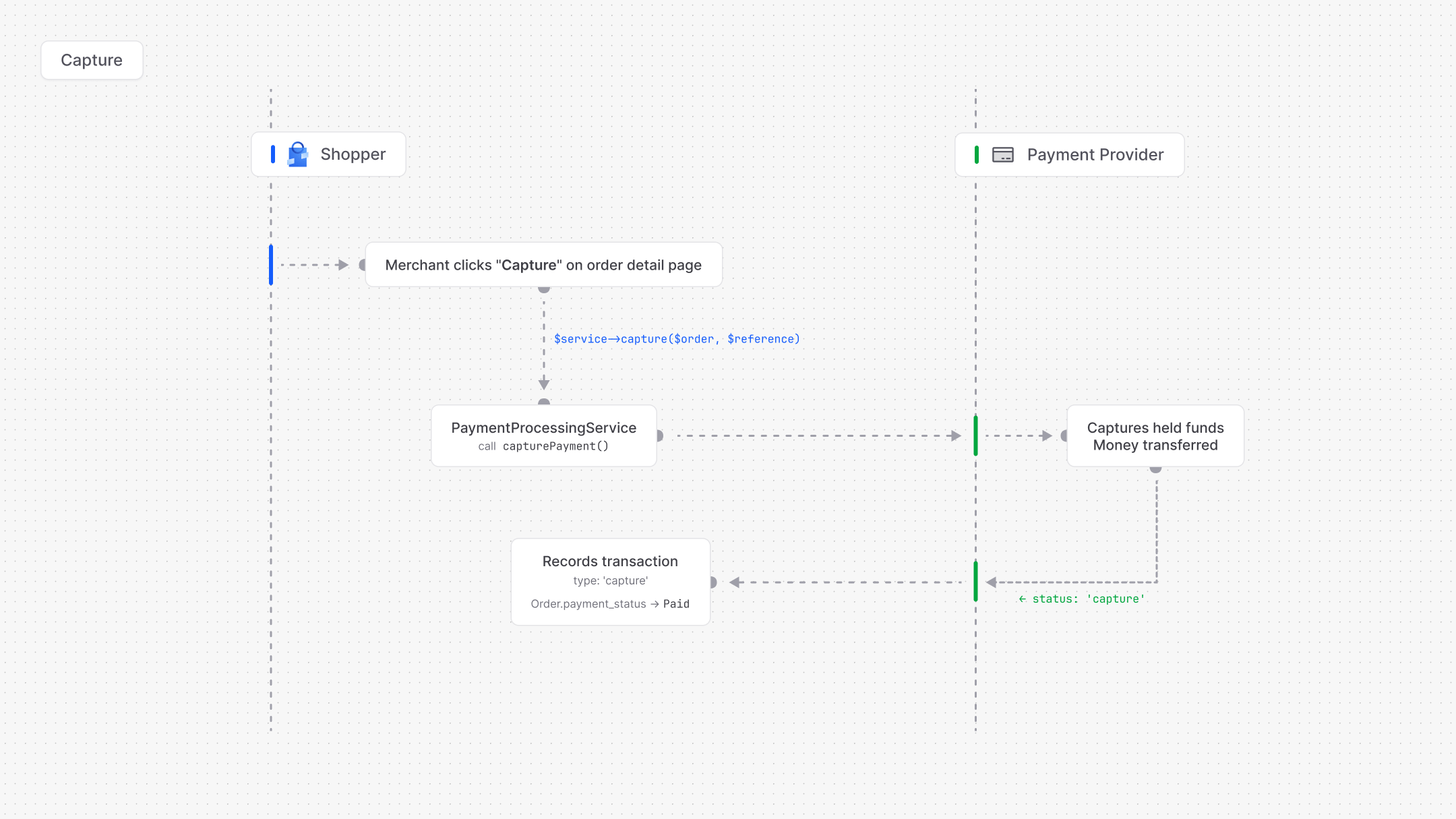
Captures an authorized payment. This is when funds are actually collected from the customer. On success, the order's `payment_status` is updated to `Paid`.
```php theme={null}
$result = $service->capture($order, $reference);
$result = $service->capture($order, $reference, amount: 5000);
```
### Refunding a Payment
Refunds a captured payment. The service automatically determines whether the order becomes `PartiallyRefunded` or `Refunded` by comparing the total refunded amount against the order total.
```php theme={null}
$result = $service->refund(
order: $order,
reference: $reference,
amount: 2000,
reason: 'Product damaged',
);
```
### Cancelling a Payment
Cancels a payment that hasn't been captured yet. On success, the order's `payment_status` is updated to `Voided`. No funds are collected.
```php theme={null}
$result = $service->cancel($order, $reference);
```
### Querying Transactions
```php theme={null}
$transactions = $service->getTransactions($order);
$reference = $service->getLatestReference($order);
```
### Getting Available Payment Methods for a Zone
The service filters payment methods by zone and only returns methods whose driver is properly configured:
```php theme={null}
$methods = $service->getMethodsForZone($zone);
```
This is used at checkout to show only the payment methods available in the customer's region. Here's how the demo store loads payment methods:
```php theme={null}
use Shopper\Core\Models\PaymentMethod;
use Shopper\Core\Models\Zone;
use Shopper\Payment\Services\PaymentProcessingService;
$zone = Zone::query()
->whereHas('countries', fn ($q) => $q->where('id', $countryId))
->where('is_enabled', true)
->first();
$service = resolve(PaymentProcessingService::class);
$paymentMethods = $service->getMethodsForZone($zone)
->map(fn (PaymentMethod $method) => [
'id' => $method->id,
'title' => $method->title,
'description' => $method->description,
'logo' => $service->getLogoUrl($method),
])
->values()
->all();
```
## Data Transfer Objects
### PaymentResult
Every driver operation returns a `PaymentResult`. This is an immutable object that carries the outcome of the operation.
```php theme={null}
use Shopper\Payment\DataTransferObjects\PaymentResult;
$result->success; // Did the operation succeed?
$result->status; // Provider status (pending, authorized, captured, etc.)
$result->reference; // Provider reference ID (Stripe PaymentIntent ID, etc.)
$result->clientSecret; // For frontend SDKs (Stripe.js, etc.)
$result->redirectUrl; // For 3D Secure, PayPal redirect, etc.
$result->amount; // Amount in cents
$result->message; // Error message on failure
$result->data; // Raw provider response data
$result->requiresAction(); // True if the customer needs to complete an action
$result->toArray(); // Convert to array for JSON responses
PaymentResult::failed('Card declined', $reference);
```
### WebhookResult
Webhook handlers return a `WebhookResult` that tells you what happened on the provider side:
```php theme={null}
use Shopper\Payment\DataTransferObjects\WebhookResult;
$result->action; // What happened: captured, failed, canceled, refunded, ignored
$result->reference; // Provider reference ID
$result->amount; // Amount in cents
$result->data; // Additional event data
$result->isIgnored(); // True for unhandled event types
WebhookResult::ignored(); // Create an ignored result
```
## Payment Status
The `PaymentStatus` enum on the Order model tracks the overall payment state. It is updated automatically by the `PaymentProcessingService` as transactions succeed.
```php theme={null}
use Shopper\Core\Enum\PaymentStatus;
PaymentStatus::Pending // Awaiting payment
PaymentStatus::Authorized // Funds held, not yet captured
PaymentStatus::Paid // Funds collected
PaymentStatus::PartiallyRefunded // Some amount refunded
PaymentStatus::Refunded // Full amount refunded
PaymentStatus::Voided // Cancelled before capture
```
### Status Transitions
| From | To | When |
| ------------------ | ------------------ | ------------------------------------------- |
| Pending | Authorized | `authorize` succeeds |
| Pending | Paid | `capture` succeeds (automatic capture mode) |
| Authorized | Paid | `capture` succeeds |
| Authorized | Voided | `cancel` succeeds |
| Paid | Partially Refunded | Partial `refund` succeeds |
| Paid | Refunded | Full `refund` succeeds |
| Partially Refunded | Refunded | Remaining amount refunded |
## Transaction Model
Every payment operation is recorded as a `PaymentTransaction`:
```php theme={null}
Shopper\Payment\Models\PaymentTransaction
```
### Database Schema
| Column | Type | Description |
| ------------------- | --------- | ------------------------------------------------------------- |
| `driver` | string | Driver code (`stripe`, `manual`, etc.) |
| `type` | string | Operation type (initiate, authorize, capture, refund, cancel) |
| `status` | string | Result (pending, success, failed) |
| `amount` | integer | Amount in cents |
| `currency_code` | string(3) | ISO currency code |
| `reference` | string | Provider reference ID |
| `data` | json | Raw provider response |
| `notes` | text | Human-readable notes |
| `metadata` | json | Custom data |
| `order_id` | bigint | FK to order |
| `payment_method_id` | bigint | FK to payment method |
| `created_at` | timestamp | Creation timestamp |
| `updated_at` | timestamp | Last update timestamp |
### Enums
```php theme={null}
use Shopper\Payment\Enum\TransactionType;
TransactionType::Initiate // Payment session created
TransactionType::Authorize // Payment authorized
TransactionType::Capture // Funds collected
TransactionType::Refund // Funds returned
TransactionType::Cancel // Payment voided
```
```php theme={null}
use Shopper\Payment\Enum\TransactionStatus;
TransactionStatus::Pending // In progress
TransactionStatus::Success // Completed
TransactionStatus::Failed // Failed
```
### Querying Transactions
```php theme={null}
use Shopper\Payment\Models\PaymentTransaction;
PaymentTransaction::query()->successful()->get();
PaymentTransaction::query()->forDriver('stripe')->get();
PaymentTransaction::query()->ofType(TransactionType::Capture)->get();
$order->paymentTransactions;
```
The `paymentTransactions` relationship is registered automatically when the payment package is installed.
## Capture Methods
Shopper supports two capture strategies. This determines *when* the customer's funds are actually collected.
### Manual Capture (Authorize-then-Capture)
Recommended for physical goods. Funds are held on the customer's card at checkout but only collected when you decide to capture.
## Payment Drivers
### Available Drivers
| Driver | Package | Code | Description |
| ------ | ----------------- | -------- | -------------------------------------------------- |
| Manual | `shopper/payment` | `manual` | No API. For cash on delivery, bank transfers, etc. |
| Stripe | `shopper/stripe` | `stripe` | Stripe PaymentIntents with 3D Secure support |
### Using the Facade
The `Payment` facade gives you access to the driver manager:
```php theme={null}
use Shopper\Payment\Facades\Payment;
$stripe = Payment::driver('stripe');
$manual = Payment::driver('manual');
$manual = Payment::driver();
Payment::availableDrivers();
Payment::configuredDrivers();
Payment::isConfigured('stripe');
```
### The PaymentDriver Contract
Every driver implements `Shopper\Payment\Contracts\PaymentDriver`:
| Method | Return | Purpose |
| -------------------- | --------------- | -------------------------------------------- |
| `code()` | `string` | Unique identifier (`stripe`, `paypal`, etc.) |
| `name()` | `string` | Display name for the admin panel |
| `logo()` | `?string` | URL to the provider's logo |
| `isConfigured()` | `bool` | Whether API credentials are set |
| `supportsWebhooks()` | `bool` | Whether the driver handles webhook events |
| `supportsRefunds()` | `bool` | Whether the driver can process refunds |
| `initiatePayment()` | `PaymentResult` | Create a payment session with the provider |
| `authorizePayment()` | `PaymentResult` | Confirm/authorize a payment |
| `capturePayment()` | `PaymentResult` | Capture funds from an authorized payment |
| `refundPayment()` | `PaymentResult` | Refund a captured payment (full or partial) |
| `cancelPayment()` | `PaymentResult` | Cancel a payment before capture |
| `retrievePayment()` | `PaymentResult` | Check payment status from the provider |
| `handleWebhook()` | `WebhookResult` | Process an incoming webhook event |
Shopper provides an abstract `Driver` class with default implementations that throw `PaymentException::notSupported()`. Extend it and override only the methods your provider supports.
## Processing Payments
The `PaymentProcessingService` is the recommended way to process payments. It wraps every driver call with:
* Automatic transaction recording in the database
* Order payment status synchronization
* Consistent error handling
```php theme={null}
use Shopper\Payment\Services\PaymentProcessingService;
$service = app(PaymentProcessingService::class);
```
### Initiating a Payment
This is the first step in any payment flow. It creates a payment session with the provider and records an `initiate` transaction.
Here's how the [demo store](https://demo.laravelshopper.dev) initiates a payment at checkout:
```php theme={null}
use Shopper\Payment\Services\PaymentProcessingService;
$service = resolve(PaymentProcessingService::class);
$result = $service->initiate($order);
if (! $result->success) {
session()->flash('error', $result->message ?? 'Payment initiation failed.');
return redirect()->route('order-confirmed', $order->number);
}
if ($result->clientSecret) {
session()->put('stripe_payment', [
'client_secret' => $result->clientSecret,
'publishable_key' => $result->data['publishable_key'],
]);
return redirect()->route('stripe-payment', $order->number);
}
if ($result->redirectUrl) {
return redirect($result->redirectUrl);
}
return redirect()->route('order-confirmed', $order->number);
```
The `PaymentResult` tells you what to do next:
* **`clientSecret`** is set. Redirect the customer to a page with the Stripe.js Payment Element
* **`redirectUrl`** is set. Redirect the customer to the provider (PayPal, 3D Secure, etc.)
* **Neither**. The payment completed immediately (manual driver, for example)
### Authorizing a Payment
Confirms a previously initiated payment. On success, the order's `payment_status` is updated to `Authorized`.
```php theme={null}
$result = $service->authorize($order, $reference, [
'payment_method' => 'pm_card_visa',
'return_url' => route('payment.callback', $order),
]);
if ($result->requiresAction()) {
return redirect($result->redirectUrl);
}
```
### Capturing a Payment
Captures an authorized payment. This is when funds are actually collected from the customer. On success, the order's `payment_status` is updated to `Paid`.
```php theme={null}
$result = $service->capture($order, $reference);
$result = $service->capture($order, $reference, amount: 5000);
```
### Refunding a Payment
Refunds a captured payment. The service automatically determines whether the order becomes `PartiallyRefunded` or `Refunded` by comparing the total refunded amount against the order total.
```php theme={null}
$result = $service->refund(
order: $order,
reference: $reference,
amount: 2000,
reason: 'Product damaged',
);
```
### Cancelling a Payment
Cancels a payment that hasn't been captured yet. On success, the order's `payment_status` is updated to `Voided`. No funds are collected.
```php theme={null}
$result = $service->cancel($order, $reference);
```
### Querying Transactions
```php theme={null}
$transactions = $service->getTransactions($order);
$reference = $service->getLatestReference($order);
```
### Getting Available Payment Methods for a Zone
The service filters payment methods by zone and only returns methods whose driver is properly configured:
```php theme={null}
$methods = $service->getMethodsForZone($zone);
```
This is used at checkout to show only the payment methods available in the customer's region. Here's how the demo store loads payment methods:
```php theme={null}
use Shopper\Core\Models\PaymentMethod;
use Shopper\Core\Models\Zone;
use Shopper\Payment\Services\PaymentProcessingService;
$zone = Zone::query()
->whereHas('countries', fn ($q) => $q->where('id', $countryId))
->where('is_enabled', true)
->first();
$service = resolve(PaymentProcessingService::class);
$paymentMethods = $service->getMethodsForZone($zone)
->map(fn (PaymentMethod $method) => [
'id' => $method->id,
'title' => $method->title,
'description' => $method->description,
'logo' => $service->getLogoUrl($method),
])
->values()
->all();
```
## Data Transfer Objects
### PaymentResult
Every driver operation returns a `PaymentResult`. This is an immutable object that carries the outcome of the operation.
```php theme={null}
use Shopper\Payment\DataTransferObjects\PaymentResult;
$result->success; // Did the operation succeed?
$result->status; // Provider status (pending, authorized, captured, etc.)
$result->reference; // Provider reference ID (Stripe PaymentIntent ID, etc.)
$result->clientSecret; // For frontend SDKs (Stripe.js, etc.)
$result->redirectUrl; // For 3D Secure, PayPal redirect, etc.
$result->amount; // Amount in cents
$result->message; // Error message on failure
$result->data; // Raw provider response data
$result->requiresAction(); // True if the customer needs to complete an action
$result->toArray(); // Convert to array for JSON responses
PaymentResult::failed('Card declined', $reference);
```
### WebhookResult
Webhook handlers return a `WebhookResult` that tells you what happened on the provider side:
```php theme={null}
use Shopper\Payment\DataTransferObjects\WebhookResult;
$result->action; // What happened: captured, failed, canceled, refunded, ignored
$result->reference; // Provider reference ID
$result->amount; // Amount in cents
$result->data; // Additional event data
$result->isIgnored(); // True for unhandled event types
WebhookResult::ignored(); // Create an ignored result
```
## Payment Status
The `PaymentStatus` enum on the Order model tracks the overall payment state. It is updated automatically by the `PaymentProcessingService` as transactions succeed.
```php theme={null}
use Shopper\Core\Enum\PaymentStatus;
PaymentStatus::Pending // Awaiting payment
PaymentStatus::Authorized // Funds held, not yet captured
PaymentStatus::Paid // Funds collected
PaymentStatus::PartiallyRefunded // Some amount refunded
PaymentStatus::Refunded // Full amount refunded
PaymentStatus::Voided // Cancelled before capture
```
### Status Transitions
| From | To | When |
| ------------------ | ------------------ | ------------------------------------------- |
| Pending | Authorized | `authorize` succeeds |
| Pending | Paid | `capture` succeeds (automatic capture mode) |
| Authorized | Paid | `capture` succeeds |
| Authorized | Voided | `cancel` succeeds |
| Paid | Partially Refunded | Partial `refund` succeeds |
| Paid | Refunded | Full `refund` succeeds |
| Partially Refunded | Refunded | Remaining amount refunded |
## Transaction Model
Every payment operation is recorded as a `PaymentTransaction`:
```php theme={null}
Shopper\Payment\Models\PaymentTransaction
```
### Database Schema
| Column | Type | Description |
| ------------------- | --------- | ------------------------------------------------------------- |
| `driver` | string | Driver code (`stripe`, `manual`, etc.) |
| `type` | string | Operation type (initiate, authorize, capture, refund, cancel) |
| `status` | string | Result (pending, success, failed) |
| `amount` | integer | Amount in cents |
| `currency_code` | string(3) | ISO currency code |
| `reference` | string | Provider reference ID |
| `data` | json | Raw provider response |
| `notes` | text | Human-readable notes |
| `metadata` | json | Custom data |
| `order_id` | bigint | FK to order |
| `payment_method_id` | bigint | FK to payment method |
| `created_at` | timestamp | Creation timestamp |
| `updated_at` | timestamp | Last update timestamp |
### Enums
```php theme={null}
use Shopper\Payment\Enum\TransactionType;
TransactionType::Initiate // Payment session created
TransactionType::Authorize // Payment authorized
TransactionType::Capture // Funds collected
TransactionType::Refund // Funds returned
TransactionType::Cancel // Payment voided
```
```php theme={null}
use Shopper\Payment\Enum\TransactionStatus;
TransactionStatus::Pending // In progress
TransactionStatus::Success // Completed
TransactionStatus::Failed // Failed
```
### Querying Transactions
```php theme={null}
use Shopper\Payment\Models\PaymentTransaction;
PaymentTransaction::query()->successful()->get();
PaymentTransaction::query()->forDriver('stripe')->get();
PaymentTransaction::query()->ofType(TransactionType::Capture)->get();
$order->paymentTransactions;
```
The `paymentTransactions` relationship is registered automatically when the payment package is installed.
## Capture Methods
Shopper supports two capture strategies. This determines *when* the customer's funds are actually collected.
### Manual Capture (Authorize-then-Capture)
Recommended for physical goods. Funds are held on the customer's card at checkout but only collected when you decide to capture.
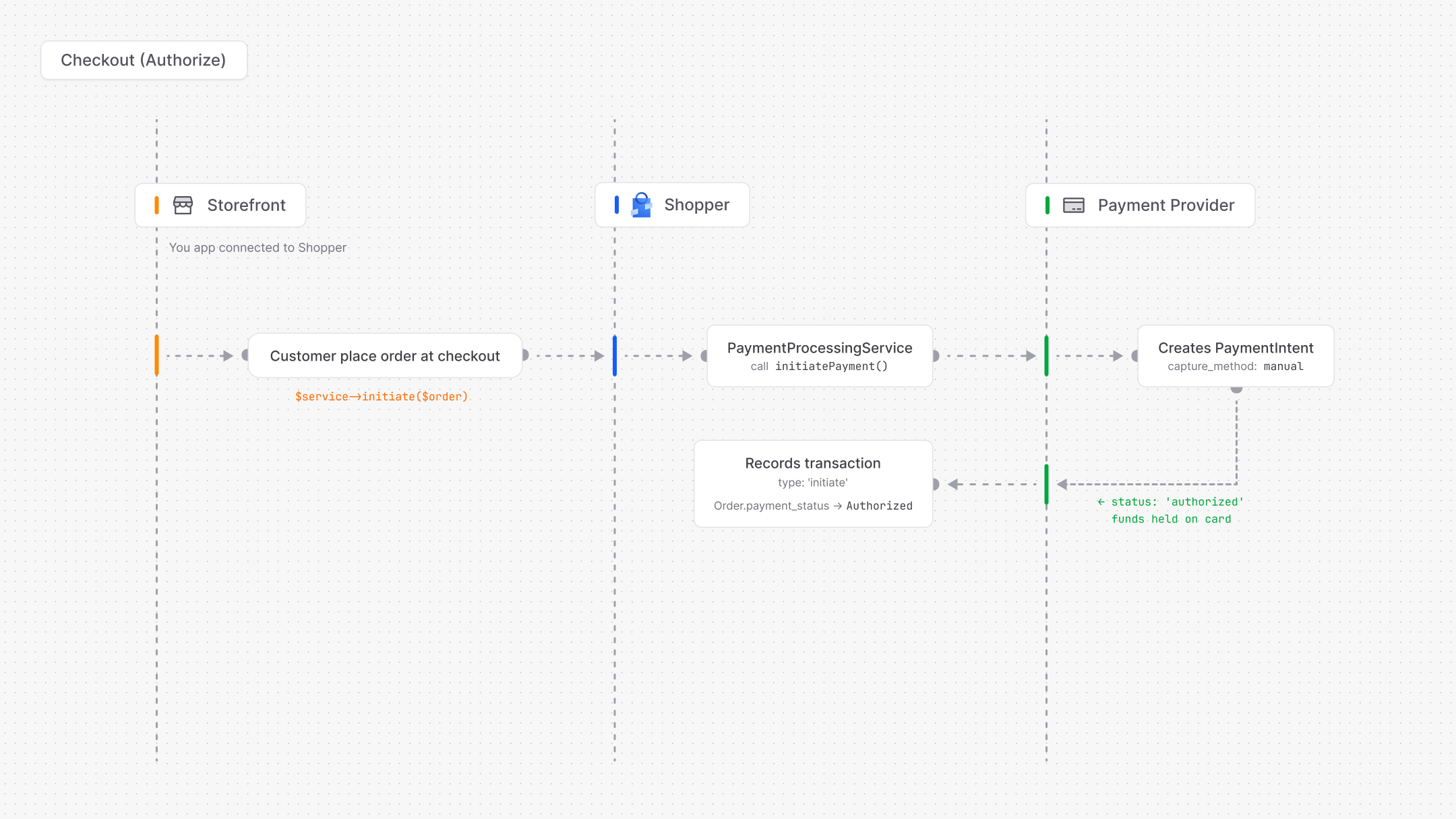 This gives you the flexibility to:
* Verify stock availability before collecting payment
* Cancel an order without processing a refund (and without refund fees)
* Capture only when the order is ready to ship
When the order is ready to ship, the merchant captures the payment from the admin panel:
This gives you the flexibility to:
* Verify stock availability before collecting payment
* Cancel an order without processing a refund (and without refund fees)
* Capture only when the order is ready to ship
When the order is ready to ship, the merchant captures the payment from the admin panel:
 ### Automatic Capture
Funds are collected immediately when the customer confirms payment. Use this for digital products, subscriptions, or when fulfillment is instant.
Manual capture is the default for the Stripe driver. Authorization holds typically last 7 days (varies by card network), so you must capture within that window or the hold is released automatically.
## Custom Drivers
You can create drivers for any payment provider: PayPal, Mollie, Razorpay, NotchPay, etc.
### Step 1: Create the Driver Class
Extend the abstract `Driver` class and implement the methods your provider supports:
```php theme={null}
namespace App\Payment\Drivers;
use Illuminate\Support\Facades\Http;
use Shopper\Payment\DataTransferObjects\PaymentResult;
use Shopper\Payment\DataTransferObjects\WebhookResult;
use Shopper\Payment\Drivers\Driver;
use Shopper\Payment\Exceptions\PaymentException;
final class PayPalDriver extends Driver
{
public function __construct(
private readonly string $clientId,
private readonly string $clientSecret,
private readonly bool $sandbox = false,
) {}
public function code(): string
{
return 'paypal';
}
public function name(): string
{
return 'PayPal';
}
public function logo(): string
{
return asset('images/payments/paypal.svg');
}
public function isConfigured(): bool
{
return filled($this->clientId) && filled($this->clientSecret);
}
public function initiatePayment(int $amount, string $currency, array $context = []): PaymentResult
{
if (! $this->isConfigured()) {
throw PaymentException::notConfigured('paypal');
}
$response = Http::withToken($this->getAccessToken())
->post($this->baseUrl().'/v2/checkout/orders', [
'intent' => 'AUTHORIZE',
'purchase_units' => [[
'amount' => [
'currency_code' => mb_strtoupper($currency),
'value' => number_format($amount / 100, 2, '.', ''),
],
'reference_id' => $context['order_number'] ?? null,
]],
]);
if ($response->failed()) {
throw PaymentException::apiError('paypal', $response->body());
}
$data = $response->json();
$approveUrl = collect($data['links'])
->firstWhere('rel', 'approve')['href'] ?? null;
return new PaymentResult(
success: true,
status: 'pending',
reference: $data['id'],
redirectUrl: $approveUrl,
amount: $amount,
);
}
public function capturePayment(string $reference, ?int $amount = null): PaymentResult
{
$response = Http::withToken($this->getAccessToken())
->post($this->baseUrl()."/v2/checkout/orders/{$reference}/capture");
if ($response->failed()) {
throw PaymentException::apiError('paypal', $response->body());
}
$data = $response->json();
return new PaymentResult(
success: $data['status'] === 'COMPLETED',
status: 'captured',
reference: $reference,
amount: $amount,
);
}
public function handleWebhook(array $payload, array $headers = []): WebhookResult
{
return match ($payload['event_type'] ?? '') {
'PAYMENT.CAPTURE.COMPLETED' => new WebhookResult(
action: 'captured',
reference: $payload['resource']['supplementary_data']['related_ids']['order_id'] ?? null,
amount: (int) (($payload['resource']['amount']['value'] ?? 0) * 100),
),
default => WebhookResult::ignored(),
};
}
private function baseUrl(): string
{
return $this->sandbox
? 'https://api-m.sandbox.paypal.com'
: 'https://api-m.paypal.com';
}
private function getAccessToken(): string
{
return Http::asForm()
->withBasicAuth($this->clientId, $this->clientSecret)
->post($this->baseUrl().'/v1/oauth2/token', ['grant_type' => 'client_credentials'])
->json('access_token');
}
}
```
### Step 2: Register the Driver
In a service provider, use `Payment::extend()` to register your driver. The closure is called lazily, only when the driver is first accessed.
```php theme={null}
namespace App\Providers;
use App\Payment\Drivers\PayPalDriver;
use Illuminate\Support\ServiceProvider;
use Shopper\Payment\Facades\Payment;
class PaymentServiceProvider extends ServiceProvider
{
public function boot(): void
{
Payment::extend('paypal', fn (): PayPalDriver => new PayPalDriver(
clientId: (string) config('shopper.payment.drivers.paypal.credentials.client_id'),
clientSecret: (string) config('shopper.payment.drivers.paypal.credentials.client_secret'),
sandbox: (bool) config('shopper.payment.drivers.paypal.sandbox', false),
));
}
}
```
### Step 3: Add Configuration
Add the driver credentials to `config/shopper/payment.php`:
```php theme={null}
'drivers' => [
'paypal' => [
'enabled' => env('PAYMENT_PAYPAL_ENABLED', false),
'sandbox' => env('PAYMENT_SANDBOX', false),
'credentials' => [
'client_id' => env('PAYPAL_CLIENT_ID'),
'client_secret' => env('PAYPAL_CLIENT_SECRET'),
],
],
],
```
And in your `.env`:
```env theme={null}
PAYMENT_PAYPAL_ENABLED=true
PAYMENT_SANDBOX=true
PAYPAL_CLIENT_ID=your-client-id
PAYPAL_CLIENT_SECRET=your-client-secret
```
### Step 4: Create the Payment Method
Link the driver to a payment method record. This is what makes it selectable at checkout:
```php theme={null}
use Shopper\Core\Models\PaymentMethod;
PaymentMethod::query()->create([
'title' => 'PayPal',
'slug' => 'paypal',
'driver' => 'paypal',
'description' => 'Pay with your PayPal account.',
'is_enabled' => true,
]);
```
The `driver` column connects this payment method to your registered driver. When a customer selects "PayPal" at checkout and the `PaymentProcessingService` processes the order, it resolves the `paypal` driver and calls `initiatePayment()`.
## Payment Method Model
The `Shopper\Core\Models\PaymentMethod` model represents a payment option available at checkout. Each method is linked to a driver (Stripe, manual, PayPal, etc.) and can be scoped to specific [zones](/v2/zones).
| Column | Type | Nullable | Description |
| -------------- | ------- | -------- | -------------------------------------------------- |
| `id` | bigint | no | Primary key |
| `title` | string | no | Display name |
| `slug` | string | no | URL-friendly identifier (unique) |
| `driver` | string | yes | Driver code linking to a registered payment driver |
| `is_enabled` | boolean | no | Whether the method is active |
| `description` | text | yes | Description shown at checkout |
| `link_url` | string | yes | External payment URL |
| `instructions` | text | yes | Post-purchase instructions |
| `metadata` | json | yes | Additional custom data |
The model uses the `HasSlug` trait and the `HasZones` trait for zone-based availability:
```php theme={null}
use Shopper\Core\Models\PaymentMethod;
PaymentMethod::query()->enabled()->get();
$method->zones;
$method->zones()->attach([$zoneId1, $zoneId2]);
```
## Storefront Checkout Example
Here is a complete checkout flow showing how the demo store creates an order and processes payment.
### Checkout Session
The checkout wizard stores each step's data in the session:
```php theme={null}
final class CheckoutSession
{
public const string KEY = 'checkout';
public const string SHIPPING_ADDRESS = 'checkout.shipping_address';
public const string BILLING_ADDRESS = 'checkout.billing_address';
public const string SAME_AS_SHIPPING = 'checkout.same_as_shipping';
public const string SHIPPING_OPTION = 'checkout.shipping_option';
public const string PAYMENT = 'checkout.payment';
}
```
### Creating the Order
After the customer completes the checkout steps, convert the [cart to an order](/v2/cart#converting-to-order) and set the payment method:
```php theme={null}
use Shopper\Cart\Actions\CreateOrderFromCartAction;
use Shopper\Cart\Facades\Cart;
$order = resolve(CreateOrderFromCartAction::class)->execute(Cart::current());
$order->update([
'payment_method_id' => session('checkout.payment.0.id'),
'shipping_option_id' => session('checkout.shipping_option.0.id'),
]);
Cart::forget();
```
### Processing the Payment
Once the order exists, initiate the payment and handle the result:
```php theme={null}
$service = resolve(PaymentProcessingService::class);
$result = $service->initiate($order);
session()->forget(CheckoutSession::KEY);
if ($result->clientSecret) {
session()->put('stripe_payment', [
'client_secret' => $result->clientSecret,
'publishable_key' => $result->data['publishable_key'],
]);
return redirect()->route('stripe-payment', $order->number);
}
if ($result->redirectUrl) {
return redirect($result->redirectUrl);
}
return redirect()->route('order-confirmed', $order->number);
```
### Routes
```php theme={null}
use App\Http\Controllers\StripeWebhookController;
Route::middleware('auth')->group(function (): void {
Route::get('/checkout', Checkout::class)->name('checkout');
Route::get('/payment/{number}', StripePayment::class)->name('stripe-payment');
Route::get('/order/confirmed/{number}', OrderConfirmed::class)->name('order-confirmed');
});
Route::post('/webhooks/stripe', StripeWebhookController::class);
```
### Automatic Capture
Funds are collected immediately when the customer confirms payment. Use this for digital products, subscriptions, or when fulfillment is instant.
Manual capture is the default for the Stripe driver. Authorization holds typically last 7 days (varies by card network), so you must capture within that window or the hold is released automatically.
## Custom Drivers
You can create drivers for any payment provider: PayPal, Mollie, Razorpay, NotchPay, etc.
### Step 1: Create the Driver Class
Extend the abstract `Driver` class and implement the methods your provider supports:
```php theme={null}
namespace App\Payment\Drivers;
use Illuminate\Support\Facades\Http;
use Shopper\Payment\DataTransferObjects\PaymentResult;
use Shopper\Payment\DataTransferObjects\WebhookResult;
use Shopper\Payment\Drivers\Driver;
use Shopper\Payment\Exceptions\PaymentException;
final class PayPalDriver extends Driver
{
public function __construct(
private readonly string $clientId,
private readonly string $clientSecret,
private readonly bool $sandbox = false,
) {}
public function code(): string
{
return 'paypal';
}
public function name(): string
{
return 'PayPal';
}
public function logo(): string
{
return asset('images/payments/paypal.svg');
}
public function isConfigured(): bool
{
return filled($this->clientId) && filled($this->clientSecret);
}
public function initiatePayment(int $amount, string $currency, array $context = []): PaymentResult
{
if (! $this->isConfigured()) {
throw PaymentException::notConfigured('paypal');
}
$response = Http::withToken($this->getAccessToken())
->post($this->baseUrl().'/v2/checkout/orders', [
'intent' => 'AUTHORIZE',
'purchase_units' => [[
'amount' => [
'currency_code' => mb_strtoupper($currency),
'value' => number_format($amount / 100, 2, '.', ''),
],
'reference_id' => $context['order_number'] ?? null,
]],
]);
if ($response->failed()) {
throw PaymentException::apiError('paypal', $response->body());
}
$data = $response->json();
$approveUrl = collect($data['links'])
->firstWhere('rel', 'approve')['href'] ?? null;
return new PaymentResult(
success: true,
status: 'pending',
reference: $data['id'],
redirectUrl: $approveUrl,
amount: $amount,
);
}
public function capturePayment(string $reference, ?int $amount = null): PaymentResult
{
$response = Http::withToken($this->getAccessToken())
->post($this->baseUrl()."/v2/checkout/orders/{$reference}/capture");
if ($response->failed()) {
throw PaymentException::apiError('paypal', $response->body());
}
$data = $response->json();
return new PaymentResult(
success: $data['status'] === 'COMPLETED',
status: 'captured',
reference: $reference,
amount: $amount,
);
}
public function handleWebhook(array $payload, array $headers = []): WebhookResult
{
return match ($payload['event_type'] ?? '') {
'PAYMENT.CAPTURE.COMPLETED' => new WebhookResult(
action: 'captured',
reference: $payload['resource']['supplementary_data']['related_ids']['order_id'] ?? null,
amount: (int) (($payload['resource']['amount']['value'] ?? 0) * 100),
),
default => WebhookResult::ignored(),
};
}
private function baseUrl(): string
{
return $this->sandbox
? 'https://api-m.sandbox.paypal.com'
: 'https://api-m.paypal.com';
}
private function getAccessToken(): string
{
return Http::asForm()
->withBasicAuth($this->clientId, $this->clientSecret)
->post($this->baseUrl().'/v1/oauth2/token', ['grant_type' => 'client_credentials'])
->json('access_token');
}
}
```
### Step 2: Register the Driver
In a service provider, use `Payment::extend()` to register your driver. The closure is called lazily, only when the driver is first accessed.
```php theme={null}
namespace App\Providers;
use App\Payment\Drivers\PayPalDriver;
use Illuminate\Support\ServiceProvider;
use Shopper\Payment\Facades\Payment;
class PaymentServiceProvider extends ServiceProvider
{
public function boot(): void
{
Payment::extend('paypal', fn (): PayPalDriver => new PayPalDriver(
clientId: (string) config('shopper.payment.drivers.paypal.credentials.client_id'),
clientSecret: (string) config('shopper.payment.drivers.paypal.credentials.client_secret'),
sandbox: (bool) config('shopper.payment.drivers.paypal.sandbox', false),
));
}
}
```
### Step 3: Add Configuration
Add the driver credentials to `config/shopper/payment.php`:
```php theme={null}
'drivers' => [
'paypal' => [
'enabled' => env('PAYMENT_PAYPAL_ENABLED', false),
'sandbox' => env('PAYMENT_SANDBOX', false),
'credentials' => [
'client_id' => env('PAYPAL_CLIENT_ID'),
'client_secret' => env('PAYPAL_CLIENT_SECRET'),
],
],
],
```
And in your `.env`:
```env theme={null}
PAYMENT_PAYPAL_ENABLED=true
PAYMENT_SANDBOX=true
PAYPAL_CLIENT_ID=your-client-id
PAYPAL_CLIENT_SECRET=your-client-secret
```
### Step 4: Create the Payment Method
Link the driver to a payment method record. This is what makes it selectable at checkout:
```php theme={null}
use Shopper\Core\Models\PaymentMethod;
PaymentMethod::query()->create([
'title' => 'PayPal',
'slug' => 'paypal',
'driver' => 'paypal',
'description' => 'Pay with your PayPal account.',
'is_enabled' => true,
]);
```
The `driver` column connects this payment method to your registered driver. When a customer selects "PayPal" at checkout and the `PaymentProcessingService` processes the order, it resolves the `paypal` driver and calls `initiatePayment()`.
## Payment Method Model
The `Shopper\Core\Models\PaymentMethod` model represents a payment option available at checkout. Each method is linked to a driver (Stripe, manual, PayPal, etc.) and can be scoped to specific [zones](/v2/zones).
| Column | Type | Nullable | Description |
| -------------- | ------- | -------- | -------------------------------------------------- |
| `id` | bigint | no | Primary key |
| `title` | string | no | Display name |
| `slug` | string | no | URL-friendly identifier (unique) |
| `driver` | string | yes | Driver code linking to a registered payment driver |
| `is_enabled` | boolean | no | Whether the method is active |
| `description` | text | yes | Description shown at checkout |
| `link_url` | string | yes | External payment URL |
| `instructions` | text | yes | Post-purchase instructions |
| `metadata` | json | yes | Additional custom data |
The model uses the `HasSlug` trait and the `HasZones` trait for zone-based availability:
```php theme={null}
use Shopper\Core\Models\PaymentMethod;
PaymentMethod::query()->enabled()->get();
$method->zones;
$method->zones()->attach([$zoneId1, $zoneId2]);
```
## Storefront Checkout Example
Here is a complete checkout flow showing how the demo store creates an order and processes payment.
### Checkout Session
The checkout wizard stores each step's data in the session:
```php theme={null}
final class CheckoutSession
{
public const string KEY = 'checkout';
public const string SHIPPING_ADDRESS = 'checkout.shipping_address';
public const string BILLING_ADDRESS = 'checkout.billing_address';
public const string SAME_AS_SHIPPING = 'checkout.same_as_shipping';
public const string SHIPPING_OPTION = 'checkout.shipping_option';
public const string PAYMENT = 'checkout.payment';
}
```
### Creating the Order
After the customer completes the checkout steps, convert the [cart to an order](/v2/cart#converting-to-order) and set the payment method:
```php theme={null}
use Shopper\Cart\Actions\CreateOrderFromCartAction;
use Shopper\Cart\Facades\Cart;
$order = resolve(CreateOrderFromCartAction::class)->execute(Cart::current());
$order->update([
'payment_method_id' => session('checkout.payment.0.id'),
'shipping_option_id' => session('checkout.shipping_option.0.id'),
]);
Cart::forget();
```
### Processing the Payment
Once the order exists, initiate the payment and handle the result:
```php theme={null}
$service = resolve(PaymentProcessingService::class);
$result = $service->initiate($order);
session()->forget(CheckoutSession::KEY);
if ($result->clientSecret) {
session()->put('stripe_payment', [
'client_secret' => $result->clientSecret,
'publishable_key' => $result->data['publishable_key'],
]);
return redirect()->route('stripe-payment', $order->number);
}
if ($result->redirectUrl) {
return redirect($result->redirectUrl);
}
return redirect()->route('order-confirmed', $order->number);
```
### Routes
```php theme={null}
use App\Http\Controllers\StripeWebhookController;
Route::middleware('auth')->group(function (): void {
Route::get('/checkout', Checkout::class)->name('checkout');
Route::get('/payment/{number}', StripePayment::class)->name('stripe-payment');
Route::get('/order/confirmed/{number}', OrderConfirmed::class)->name('order-confirmed');
});
Route::post('/webhooks/stripe', StripeWebhookController::class);
```